
Roll Your Heroes Prestige guide
Open Prestige to see your projected Souls and progress toward another trinket. Take a moment to read the reset message before committing, especially if you have just spent gold leveling a hero.
Last checked
What resets when you Prestige?
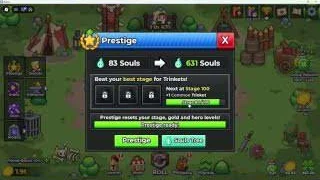
The Prestige window in AlphaShoe’s gameplay explicitly says your stage, gold and hero levels reset. Hayworks’ game description also ties Prestige progression to additional team slots. Look at the unlocks shown on your own account before deciding to start over.
Read the Souls and trinket preview
- Open Prestige and read the Souls values on each side of the arrow. Use the values from your current run when comparing the gain.
- Check the trinket row under the Souls preview. The window ties trinkets to beating your best stage and shows the next milestone.
- Compare the gap to that milestone against your last boss attempt. If one extra damage upgrade could get you there, try it and reopen Prestige to see whether the preview changed.
Prepare the next lineup
Note which heroes carry the current team and how much damage they contribute. After a Prestige, open Heroes to check your levels and available slots. Fill an extra slot when one opens, then put your first level upgrades into a hero that speeds up your return through early stages.